Posts
-
Migrating to Jekyll
After yet another security breach on my Wordpress blog, this time one that all the great security tools didn’t catch, I’ve decided to migrate to a static page hosting solution.
-
Case Study: Micro-services using Erlang
At the Erlang User Conference 2017 (EUC17) in Stockholm Sweden, I presented our experience of how Alert Logic moved to a new micro-services architecture using our preferred programming language: Erlang.
-
Rapid Prototyping with MacroFab, Part 2
As I described in Part 1, I am using MacroFab for rapid prototyping of my jeepbot concept project. In this post, I’ll describe the next phase of my project and how MacroFab has made it easy to get there.
-
Rapid Prototyping with MacroFab, Part 1
As part of my jeepbot project, I wanted to build some printed circuit boards (PCBs) to test the concept, try out different designs, and generally just have a real solution. I learned quickly that going from LEGO-style building blocks based on Arduino boards to my own PCB was another learning curve with a lot of unknowns. There are certainly plenty of tutorials online for designing boards, board houses for building them, etc., but it certainly wasn’t an easy or inexpensive job for those learning how to build. As a result, my project languished a bit as both my day job became more demanding (and amazing, rewarding) and the work effort for this project began to look larger and more complicated than I had anticipated.
-
CAN Bus Hacking with the Arduino and Raspberry Pi
In December of 2013, I published a set of videos on YouTube discussing how to do CAN bus hacking using an Arduino and/or Raspberry Pi. These videos were made in conjunction with my Jeep hacking projects.
-
Epic Bicycle Rides - Corona Pass in Winter
I biked up Corona Pass on 1/1/2016.
-
Feature Survey - Intelligent Accessory Controller
If you saw my post about hacking the CAN-Interior bus of a JK, you noticed my comments about building an intelligent accessory switching system. I’m pretty far along with that, and would love to get some feedback from the community on features they’d like to see.
-
Jeep Bot - Proof of Concept #1
I finished the 1st proof-of-concept for using the CAN-Bus data to control auxiliary relays. It worked great. Attached is a block diagram of what I used, and a longish video of how the testing went.
-
Hacking the Jeep Interior CAN-Bus
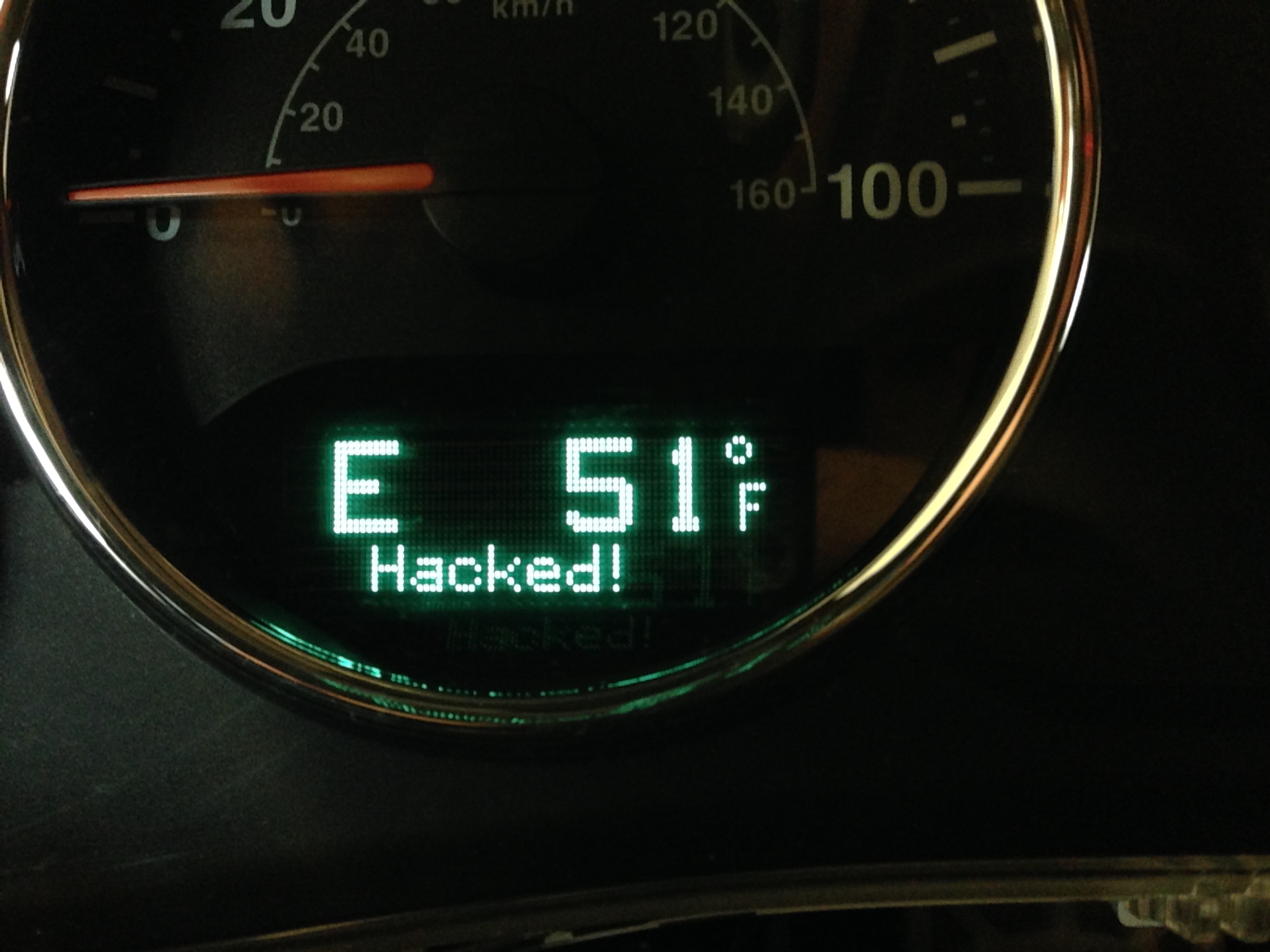 The Jeep’s Electronic Vehicle Information Center (EVIC) Displays a Custom Message
 -
JavaScript Evaluation for Erlang Applications
If you are an Erlang developer you are likely familiar with the Riak storage engine, and how the MapReduce feature can evaluate arbitrary JavaScript expressions. Can you use this same code to do your own JavaScript evaluations for your Erlang projects? Yes, and it turns out to be surprisingly easily.
-
URL Shortening for Mac OS X and iOS
Today I’m releasing version 1.0.0 of URLKit, a library to find and shorten URLs for Mac OS X and iOS applications.
-
Project Dependencies and Include Files in Xcode
I have read a lot of how-to guides on blogs over the past few years on how to set it up Xcode sub-projects so you can build your project, a dependent sub-project, and have all the header files and libraries be found. Invariably, this involves changing Xcode project settings both in your main application, and in the sub-project so that everything works out. This is wrong!
-
Lessons Learned on using Chef from Development to Production
Over the past six-months, my team at Alert Logic started and deployed a project where we made heavy use of the Chef infrastructure automation tool. We decided to use Chef from the ground up in our development cycle, from initial coding and testing all the way through final production deployment. Here are some important lessons we learned from the experience.
-
My 2011 Leadville Trail 100 Experience
In August of 2011 I raced my first Leadville Trail 100 mountain bike event. I was lucky enough to get past the lottery system in February, and spent most of the rest of the spring and summer preparing for the event. This is the story of my training leading up to the actual event and the details of the event itself.
-
Comparing Colorado Snowpack - 2009 vs 2011
I managed to take a picture of the Taylor Reservoir this June in almost the same place as when I took a picture in June 2009. Both pictures were taken while riding on bicycle tours, but the results are very different.
-
2011 Ride the Rockies - Looking Back...
About the time I crossed the Oklahoma border I knew my Colorado vacation was officially over. The temperature gauge in the truck said 105 degrees, and it got worse by the time I reached DFW (thankfully it was a bit cooler once I reached the coast). One day prior, I was standing on top of Berthoud Pass shivering in the ~40 degree temperatures after a nice climb up the pass.
-
2011 Ride the Rockies - Day 4 - The 'Easy' Day at Steamboat Springs
Today was the ‘easy’ day of this year’s Ride the Rockies. A relatively easy 50-mile loop in the Steamboat Springs area, or if you were so inclined, a nice day off to relax without having to relocate. A two-night stays in a single place is a great thing for riders on a long bicycle tour.
-
2011 Ride the Rockies - Day 3 - Tough day, but great views
I wouldn’t have guessed from looking at the official route profile for the Edwards to Steamboat Springs ride that it would turn out to be my hardest day of the tour. Sure, the length of the route is 5 miles longer than the previous 2 days, but there were only two relatively small climbs shown on the profile, and a long downhill into Steamboat itself. A piece of cake, especially when compared to the Cottonwood Pass climb we did on day 1, right?
-
2011 Ride the Rockies - Day 2 - Windy Climbs on the Way to Leadville
Day 2 started out a bit nicer than day 1 – it was 10 degrees or so warmer in Buena Vista than Crested Butte, making getting ready a whole lot more enjoyable.
-
2011 Ride the Rockies - Day 1
Today was the day I was looking forward to the most during this year’s Ride the Rockies. I’ve ridden up Cottonwood Pass before, but never got a chance to descend.
-
2011 Ride the Rockies - Preparing for the Ride
When I finally made it to 12,000 ft elevation, I thought for sure I’d feel better than I had in the past. After all, I live at sea level, and any additional time at high elevation should help my acclimation quite a bit. This year, I’ve been in Colorado exploring and training for almost a full month before the Ride the Rockies begins - I should be getting somewhat used to the higher altitudes by now. But that climb up to 12,000 ft reminded me how foolish I was to think it would come so easy. It was easy to get out of breath just doing a normal pace walk, even after all the time here.
-
Dachau Concentration Camp and the Passage of Time
A month ago, in April 2011, I took a trip to Munich, Germany and the surrounding area. One of the must-see sights there is the Dachau Concentration Camp Memorial Site, just outside of Munich and near the village of Dachau.
-
Robustness in the Midst of Chaos
I’ve been catching up on technology news this week, after a few months of completely ignoring it. One of my favorites so far has been Netflix’s brief post on 5 Lessons We’ve Learned Using AWS. Within, they discuss the importance of testing your systems ability to survive failure in a infrastructure that is inherently chaotic and prone to failure (a fundamental characteristic of massively scalable clouds).
-
Breaking the High-Information Habit
In January of 2011 I took a deliberate break from my high-information diet. No news, television or on-line, no blogs, no Facebook, no Twitter for a whole month. It was awesome, and highly effective at completely breaking my high-information diet habit.
-
2011 Aramco Houston Half-Marathon
Today I ran the Aramco Houston Half-Marathon and set a new personal record (PR) of 1:59:18. Not only did I beat my goal of 2 hours, I bested my previous PR by 10:17.
-
Newbie's Guide to Training for a MS 150
A couple of weeks ago, registration opened for the big BP MS150 charity bicycling event between Houston and Austin, Texas. This particular MS 150 is one of the largest organized rides in the country with approximately 13,000 riders each year. It’s a two-day ride with options from 75 to 100 miles on the first day, and around 65 to 80 miles the second day.
-
2010 Ride the Rockies
From June 13th through 19th I rode in the 25th anniversary edition of the Ride the Rockies bike tour. I had planned on doing either this ride or the Bicycle Tour of Colorado again, but since I made it past the lottery for Ride the Rockies I picked that one for a slightly different experience. I had briefly flirted with the idea of doing both rides back-to-back, but was talked out of that after realizing how difficult it would be to enjoy both weeks with such high fatigue levels.
-
You Don't Need Flash for Rich Graphs on a Web Page
Adobe’s Flash has a lot of uses, but one of the most impressive to me has been the the creation of interactive graphs on a web page. One just has to visit Google Finance to see a great example of this in action; it’s fast, effective and fits seemlessly within the rest of the page.
-
An Early iPad Review
I’ve been using the iPad heavily for 2 days now. There is an awful lot of potential in this device, ands there is no doubt that the best is yet to come.
-
Lightning Quick Summary of the Houston Auto Show
New BMW 5-series Gran Turismo = stunner, inside & out. Was happy to see roof-rack slots are back for the 5-series (presumably the new sedan out later this year will have them as well).
-
2009 Bicycle Tour of Colorado
During the week of June 21st I participated in the 2009 Bicycle Tour of Colorado. This was my first true bicycle tour, having previously only ridden in two-day events. We rode in a loop around the Gunnison National Forest in central Colorado and put in approximately 500 miles in 6 days of riding. The tour was brutal, difficult, treacherous and totally awesome.
-
Connecting to Apple Push Notification Services using Python & Twisted
One of the exciting features of the upcoming iPhone 3.0 operating system is the ability for a device to receive a notification message from your own application that is relayed by Apple’s network cloud. This feature allows the iPhone to channel all out-of-band communication into a narrow channel that is low impact on the device from a power, security and usability point-of-view.
-
The BP MS 150
The weekend of April 18th & 19th, 2009, was the 25th annual MS 150 ride from Houston to Austin. This year’s ride promised to be a great one, but unfortuantely mother nature threw a kink in all of the plans.
-
One Year at Zenoss
Yesterday marked my one-year anniversary at Zenoss. When I decided to take the job at Zenoss I knew it would be a challenging position, and time has proven this assumption correct. The new (to me, anyway) technology, the remote work environment and the realities of a startup company with limited resources have all added their own challenges to the job.
-
Secure Windows Monitoring with Zenoss
Starting with version 2.3.x, Zenoss can monitor computers running Microsoft Windows with a variety of data collection protocols: SNMP, WMI over DCOM/MS-RPC and Perfmon over MS-RPC.
-
Getting a Native Code Stack Trace from a Zenoss Daemon
Zenoss uses the Python programming language for the vast majority of its code, and all of the daemons and commands that run are Python scripts. Several daemons also make use of native code (i.e. code written in languages like C or C++ that must be compiled into object files and organized into libraries) to perform functions such as remote Windows and SNMP connectivity.
-
new MacBook setup
I bought another Mac today, a nice 2.4 GHz 13-inch unibody MacBook. I had planned on buying a 17-inch unibody MacBook Pro, and very nearly did, but luckily sanity won out and I remembered how much of a hassle it was to carry around those giant things, even if they are only “only” 6.6 lbs.
-
Oddities in Gathering Windows Performance Data
At Zenoss we do quite a bit of remote monitoring of computers running Windows. In the Enterprise edition of the product, we collect raw performance counter data using the conventional remote Windows Registry APIs.
-
My Houston Marathon Experience
On January 18th, 2009 I ran the Chevron Houston Marathon - my first full marathon - and finished in 4 hours, 54 minutes and 42 seconds.
-
Looking Back on a Old Project
In 2000 I began work on a client application for the ICB chat system. At the time, the best client for the system was the old-school UNIX client that worked using a terminal interface. For things like chat, terminal interfaces are fantastic but at some point they began to stop keeping pace with the rest of technology. For example, a common activity in any chat system is the sharing of URLs for other users to view. Most terminal applications at the time (many of the Linux-based terminal applications have since improved upon this) did not support this, so users were forced to cut & paste URLs - not a fun process.
-
Biking in Big Bend - Old Ore Road
Yesterday I took the mountain bike down Old Ore Road in Big Bend National Park. The park’s website calls this route the premier ride in the park so I just had to try it.
-
Biking in Big Bend - Chisos Basin to Rio Grande Village
Today I took my road bike on a trip from the Chisos Basin down to the Rio Grande Village in Big Bend National Park. This is a 30 mile one-way route that is almost entirely downhill.
-
Tour de Pink
Sunday was the annual Tour de Pink bicycle ride, starting out of Prairie View A&M University. This ride supports the Pink Ribbons Project charity, which raises awareness for fighting breast cancer. This ride is always one I look forward to given it effectively kicks off the fall cycling season, and is the first big ride after the summertime lull.
-
Biking in Fredericksburg
This past weekend Lori and I visited Fredericksburg, Texas for some rest and relaxation. I of course took my bike and hoped to squeeze in a couple of rides while there given the natural beauty of the area. I was not disappointed.
-
Memorial Park Criterium, Week 6
Tonight I raced in my second bicycle criterium at the crit series held every Wednesday night in Memorial Park. This was week 6 of the series this summer and the first chance I had to race; I had been out during week 4 but I forgot my cycling license that day so I just watched.
-
Kayaking over 4th of July Weekend
Over the fourth of July weekend, my Dad and I went kayaking along coastal Texas.
-
2008 Zenoss Summer Party

Originally uploaded by blunck2
subscribe via RSS